Workcation in Hokkaido by Campervan | Practical Guide to Connectivity, Power & Workspace Setup [2026 Edition]
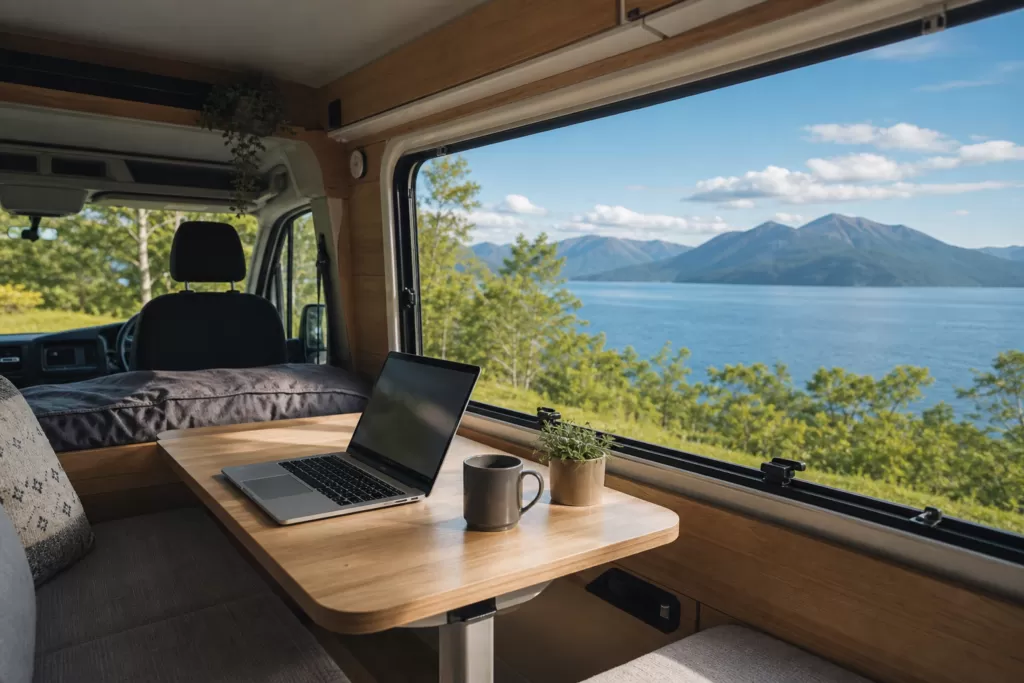
Many people wonder whether it’s really possible to work while gazing at Hokkaido’s sweeping natural scenery from inside a campervan. The short answer: with the right preparation, it absolutely works. That said, it’s not as simple as “just have Wi-Fi.” You need to address three things simultaneously: connectivity, power, and workspace. This article dives into the realities of Hokkaido’s regional conditions and gives you the practical know-how to make a campervan workcation happen.
What It Takes to Make a Campervan Workcation Work in Hokkaido
A “workcation” combines work and vacation. With a campervan, you can change your base every night while keeping accommodation costs low—travelling across Hokkaido’s vast landscape without stopping work.
That said, there are minimum conditions you need to meet to make this work in Hokkaido.
- No more than 2–3 online meetings per day: Long meetings inside a vehicle are draining. Plan your schedule so travel days are meeting-free.
- Output-based work: This style suits remote work environments where you’re evaluated on results, rather than workplaces with strict attendance tracking.
- Pre-departure gear check: Mobile batteries, pocket Wi-Fi routers, and adapter cables can be bought at Hokkaido home improvement stores, but options are limited north of Asahikawa.
- Stay for at least one week: Given the time spent on setup, travel, and pack-down, productivity suffers on 3-night trips. Aim for a minimum of 5–7 nights.
In terms of job types, engineers, designers, writers, consultants, and remote sales staff find this style easiest to pull off. More and more people are completing 1–2 week campervan workcations in Hokkaido every year.
Sample One-Week Model Schedule
The pattern that works best is: focus on work in the morning, use the afternoon for travel and sightseeing. Here’s a sample one-week workcation traversing central to eastern Hokkaido.
| Day | Morning (Work) | Afternoon (Travel / Sightseeing) | Overnight |
|---|---|---|---|
| Mon | Pick up campervan near New Chitose Airport, confirm setup | Head toward Lake Shikotsu | RV park near Lake Shikotsu |
| Tue | Work at RV park (8am–noon) | Drive toward Hidaka area | Roadside station (Michi-no-Eki) Mukawa Shiki-no-Yakata |
| Wed | Morning meeting while driving toward Obihiro | Supplementary work at a café in Obihiro | Obihiro RV park |
| Thu | Focused work, based in Obihiro | Lake Shikaribetsu / Nukabira area | Obihiro RV park (2nd night) |
| Fri | Weekly report, submit deliverables | Drive to Kushiro Marshland | RV park near Kushiro |
| Sat | (Day off) | Sightseeing at Lake Akan and Lake Mashu | Eastern Hokkaido RV park |
| Sun | (Day off) | Drive back to New Chitose Airport for return | Return home or extend stay |
Scheduling all travel in the afternoon keeps mornings free for focused work while still leaving room for sightseeing. On Tuesday and Thursday—typically heavy meeting days—staying put for two nights eliminates travel disruption.
Securing Connectivity (Mobile Coverage, Pocket Wi-Fi, and Starlink)
Connectivity is the first wall you’ll hit in a campervan workcation. Hokkaido’s vast area means out-of-coverage zones are far more common than on Honshu—assuming “a pocket Wi-Fi will be fine” is a dangerous mindset.
The Reality of Carrier Coverage in Hokkaido
Looking at each carrier’s Hokkaido coverage maps, central (Doo) and southern Hokkaido’s major cities have solid 4G/LTE coverage—but northern (Dohoku) and eastern (Doto) Hokkaido are a different story.
- NTT Docomo: The widest coverage in Hokkaido. Major roads in northern Hokkaido (Wakkanai, Esashi, Hamatonbetsu) and eastern Hokkaido (Nemuro, Shibetsu, Nakashibetsu) are generally covered. However, mountainous areas and forest roads go out of range.
- SoftBank (including LINEMO): No problems in central and southern Hokkaido, but coverage in the inland areas of northern and eastern Hokkaido is narrower than Docomo, with patchy dead zones. The Soya Line corridor and the interior of the Shiretoko Peninsula require particular caution.
- au (including UQ WiMAX): Second only to Docomo in coverage, with some areas of eastern Hokkaido where au actually outperforms Docomo.
- Rakuten Mobile: As of 2026, coverage in Hokkaido is improving, but rural areas rely on the partner network (au), which tends to slow speeds.
For online meetings in northern and eastern Hokkaido, Docomo is the first choice. If you primarily use SoftBank, we strongly recommend bringing a Docomo-network budget SIM as a secondary connection.
How to Choose a Pocket Wi-Fi Router
Most rental pocket Wi-Fi routers offer a choice of Docomo, au, or SoftBank networks. For Hokkaido, choose a Docomo-compatible model and check that it offers an unlimited plan for data-heavy days (video calls, large file transfers).
Even in spots where a pocket Wi-Fi struggles to connect, smartphone tethering over your carrier’s network may still work. The most stable setup is carrying two devices: a pocket Wi-Fi router plus smartphone tethering as backup.
Starlink as an Option
SpaceX’s satellite internet “Starlink” works even in areas with no mobile coverage, making it a strong option for anyone wanting to workcation in remote northern or eastern Hokkaido. A growing number of RV parks and private campgrounds have now installed Starlink on-site.
If you sign up personally for Starlink’s RV plan, be aware that hardware costs several tens of thousands of yen upfront. Download speeds of 100–200 Mbps are more than sufficient, but the connection can become unstable in heavy rain or dense fog. Practically speaking, the easiest starting point is to choose accommodation that already has Starlink available.
Compare Hokkaido Campervan Rental Companies
Base yourself at New Chitose Airport and compare rates, vehicle types, and pickup locations all in one place.
Compare rental companies & prices →Power and Battery Management (Power Consumption of PC, Monitor, and Charging)
Second only to connectivity in importance is power. Campervans come with a sub-battery, but running it for extended workcation use drains it faster than you might expect—planned management is essential.
Estimated Power Consumption by Device
Start by knowing how many watts each device you use actually consumes.
| Device | Power consumption (approx.) | Consumption per hour (Wh) |
|---|---|---|
| Laptop (14–16 inch) | 30–60W | 30–60Wh |
| External monitor (24-inch FHD) | 20–40W | 20–40Wh |
| Smartphone charging | 5–20W | 5–20Wh |
| Pocket Wi-Fi charging | 5–10W | 5–10Wh |
| LED desk lamp | 5–10W | 5–10Wh |
| Small fan (summer) | 10–30W | 10–30Wh |
Working 8 hours a day on a laptop alone consumes roughly 240–480Wh. Add an external monitor and you’re looking at up to 640Wh. A typical campervan sub-battery is 100–200Ah, which at 12V equals 1,200–2,400Wh in theory—enough for 3–4 days. However, draining the battery below 50% shortens its lifespan, so in practice capping usage at 60–70% means you’ll need daily driving recharge or an external power source.
Three Patterns for Securing Power
- Stay multiple nights at an RV park with shore power hookup: The most reliable option. An RV park with AC 100V hookups lets you plug your laptop directly into a wall outlet. Major areas like Obihiro, Kushiro, and Asahikawa have powered RV parks.
- Build driving recharge into your schedule: 2–3 hours of driving per day is enough to replenish the sub-battery. Since afternoon travel doubles as recharging time, this pairs naturally with the “work mornings, drive afternoons” cycle.
- Bring a portable power station: Renting or bringing a unit like the Jackery 1000 (1,002Wh) nearly doubles your effective battery capacity. Note that these weigh around 10kg, so check the payload limits of your vehicle.
How Much Do Solar Panels Help?
Some campervans come with roof-mounted solar panels. Hokkaido summers have long daylight hours (14–16 hours per day from June to August), and a 100W panel on a sunny day can generate 400–600Wh—enough to roughly cover a laptop’s daily consumption. That said, during cloudy or rainy stretches from late July into August (Hokkaido doesn’t have a traditional rainy season, but overcast days are common), treat solar as supplemental rather than primary.
In-Vehicle Workspace: Posture, Lighting, and Setup Tips
Even with connectivity and power sorted, a poor work environment will make long hours miserable. The interior of a campervan is a limited space, but with the right setup it becomes a genuinely functional desk-work environment.
Workspace Differences by Vehicle Type
Campervans broadly fall into cab-over, van conversion, and bus-conversion types. Understanding these differences before booking for a workcation will save you from a poor fit.
- Cab-over campervan: Spacious living area with room for a proper table and chair setup. Models like the Cresson Journey have a fixed table well-suited to long working sessions.
- Van conversion campervan: Compact and easy to manoeuvre, but the workspace is tighter. You’ll need to bring a folding table or similar workaround.
- Kei camper (mini campervan): An option for solo travellers, but there’s virtually no room for an external monitor—laptop-only work is the assumption.
Posture and Back Pain Prevention
Using a laptop on the sofa or bed inside a campervan leads to slouching, and your back and neck will hurt within a day. Combine these countermeasures:
- Laptop stand: Raises the screen to eye level, reducing neck strain. A foldable model under 200g won’t add meaningful weight to your luggage.
- External keyboard and mouse: Paired with a stand, these let your wrists and shoulders settle into a natural position.
- Lumbar support cushion: Campervan seating is not designed for extended desk work. A slim lumbar support pillow makes a significant difference.
- Step outside every hour: A short walk between work sessions clears your head, and Hokkaido’s air and scenery make the break itself a reward. This is the greatest privilege of campervan workcations.
Lighting
Standard campervan lighting tends to be warm-toned and dim—making screens hard to read during night work or on overcast days. Bringing a single small USB-powered LED desk lamp (5–10W) dramatically improves your working light. A colour temperature of 5,000–6,000K (daylight white) is easy on the eyes for extended sessions.
If you’re on camera during online meetings, backlight or a dim interior leaves a poor impression on the other end. Attaching a small ring light to your laptop provides consistent, stable video regardless of outdoor lighting conditions.
Choosing a Base (RV Parks, Roadside Stations, and Wi-Fi-Equipped Facilities)
“Where you stay” in a workcation directly affects your connectivity and power supply. Hopping between free roadside stations (Michi-no-Eki) alone won’t solve power access—and some don’t allow multi-night stays. Build your plan around RV parks.
Why RV Parks Are the Strongest Option
An RV park is a paid parking facility dedicated to or prioritised for campervans, equipped with power hookups, drainage, and toilet facilities. Hokkaido has one of the highest concentrations of RV parks in Japan, with sites scattered near major tourist destinations.
Key things to look for when choosing an RV park for workcation use:
- AC 100V power hookup: Lets you plug your laptop and monitor directly into a wall outlet, removing battery anxiety entirely.
- Multi-night stays allowed: Moving every single night is inefficient, and staying put on meeting-heavy days protects your productivity. Confirm multi-night availability in advance.
- On-site Wi-Fi: Some RV parks provide their own Wi-Fi. Useful as a supplement to mobile data, though speeds vary significantly between facilities.
- Nearby convenience store or supermarket: Check whether food and drink can be sourced on foot or via a short drive.
We’ve compiled a full guide to Hokkaido RV parks, including area-by-area pricing, facilities, and booking information—use it to plan your route.
→ Hokkaido RV Park Directory: Area-by-Area Guide
How to Use Roadside Stations (Michi-no-Eki)
Roadside stations are best treated as mid-route rest stops, food resupply points, and information hubs. Some Hokkaido roadside stations offer free indoor Wi-Fi, so stopping to connect and do light work while en route to an RV park is a practical use case.
That said, overnight stays in roadside station car parks are intended for brief rest only. Multi-night stays or extended occupancy inconveniences other users. Avoid using them as your primary workcation base.
Supplementary Use of Cafés and Co-Working Spaces
Regional cities like Obihiro, Asahikawa, and Hakodate have co-working spaces and cafés with reliable power and Wi-Fi. On days with back-to-back online meetings, or when you need a fast wired LAN connection, parking the campervan nearby and heading to a co-working space is an effective combination. Day-use rates are typically ¥1,000–2,000 and may qualify as a business expense.
New Chitose Airport / Tokachi-Obihiro Airport
Rent the Cab-Over “Cresson Journey”
Base yourself at New Chitose Airport and travel all across Hokkaido by campervan.
View details at Moving Inn →Frequently Asked Questions (FAQ)
Q: How much does a campervan workcation in Hokkaido cost?
For one week, expect roughly ¥70,000–150,000 for campervan rental (7 days), ¥14,000–28,000 for RV park fees (¥2,000–4,000 × 7 nights), ¥5,000–10,000 for fuel (depending on mileage), and ¥20,000–30,000 for food and miscellaneous expenses. Total: approximately ¥100,000–220,000. Compared to hotel-based travel, the longer your stay, the stronger the cost advantage of a campervan.
Q: What do I do about meetings if my phone goes out of coverage?
The fundamental approach is to know your schedule in advance and plan routes that avoid out-of-coverage areas during meeting times. If you can’t avoid a dead zone, either reschedule the meeting or switch to audio-only (phone conference). Agreeing in advance with your workplace on a “no meetings on travel days” rule is also effective.
Q: Is Hokkaido hot in summer? Will working inside the campervan be uncomfortable?
Hokkaido summers (July–August) are cooler than Honshu, and days above 30°C are relatively rare outside the inland areas of central Hokkaido. That said, recent years have seen temperatures reach around 35°C in Obihiro and Asahikawa. Most campervans come with windows, a roof ventilator, and a fan, keeping mornings and evenings comfortable for work. If the interior heats up during the day, park in shade, run the engine for air conditioning, or relocate to a café.
Q: Can a first-timer drive a campervan?
Most models are driveable on a standard licence (including automatic-only). Even a cab-over such as the Cresson Journey is 4.99m long — small enough for a standard parking space — and most people get comfortable with the feel within a day or two. Hokkaido roads are characterised by long straight stretches with good visibility, making it an ideal region for first-time campervan driving. Be mindful of parking garage height restrictions (vehicles over 2.5–3m) and narrow road access. Ask the rental staff for driving tips at pick-up.
Q: What workcation expenses can I claim from my company?
Depending on company policy, business-necessary communication costs (pocket Wi-Fi rental) and co-working space usage are often reimbursable. Campervan rental and accommodation fees are harder to separate from personal vacation expenses—discuss with your manager and accounting team in advance. Freelancers and sole traders may be able to claim expenses where there is a genuine business component (consult a tax professional for specific guidance).
Q: Should I sign up for Starlink personally?
For a workcation of around one week, choosing accommodation that already has Starlink is far better value than signing up personally. Hardware costs around ¥50,000 upfront, plus ongoing monthly fees—making it suited to heavy users who work remotely in Hokkaido multiple times a year. If you frequently do remote work in northern or eastern Hokkaido, the RV plan is worth looking into.
A Hokkaido campervan workcation—working while travelling—is fully achievable once the preparation is in place. Start by concretely confirming your connectivity, power, and workspace setup, then build a multi-night RV park plan around that.
Book a Campervan in Hokkaido
Moving Inn New Chitose Airport supports English booking and offers airport transfers.
![Campgrounds Near Tokachi-Obihiro Airport: 8 Sites Within 30 km, Compared by Vehicle Access, Power and Price [2026]](https://hokkaido-campingcar.jp/wp-content/uploads/2026/10/photo-obihiro-airport-featured-pl232-768x512.jpg.webp)
![Campgrounds Near Hakodate Airport: 12 Sites Within 30 km, Compared by Vehicle Access, Power and Price [2026]](https://hokkaido-campingcar.jp/wp-content/uploads/2026/10/photo-hakodate-airport-featured-hl4722-768x484.jpg.webp)